The problem with data is rarely an issue of quantity. A security team may be dealing with thousands of Findings from multiple scanners with various risk levels and separate corresponding remediation workflows, but the difficulty of how to address each issue quickly becomes apparent. How each Finding gets prioritized and ultimately addressed is unique to each organization, but DefectDojo's Triage Engine gives security teams a way to preprogram and scale that workflow, allowing them to automatically evaluate Findings and Assets and take actions based on their specific security strategy.
With new capabilities included in Rules Engine 2.0, you can automate everything from simple status changes to intricate, multi-layered remediation processes. In this article, we’ll show you how to get started, and where to take it from there.
NOTE: Triage Engine is the overarching Pro-only feature for rules-based triage and automation. It includes the original Rules Engine and the newer Rules Engine 2.0, the latter of which is turned off by default and is currently in Beta. A Superuser can enable Rules Engine 2.0 by toggling the corresponding pill in the Feature Flags section of the sidebar, under Settings.
Vulnerability Triage And Why It Matters
Triage determines what your organization should do after a scanner tells you what’s wrong, and that decision is based on a variety of factors: Context, severity/risk, ownership, etc. Every organization’s approach is different, but no matter the differences, triage can present a bottleneck if every human decision is reliant on an ensuing manual action. A security team that has to review a Finding, evaluate its importance, identify the owner, notify them, assign it, create a ticket, and track the results is spending unneeded time on repetitive work instead of those that genuinely require a hands-on fix.
A triage process that distinguishes between routine decisions and those that genuinely require human judgment allows your team to automate predictable steps in your remediation workflow so you focus on what actually matters. That’s where Triage Engine comes in.
Meet The Triage Engine
DefectDojo’s Triage Engine turns the rules your team already follows into repeatable workflows that scale as your security program evolves. Triage Engine brings together DefectDojo's rules-based automation capabilities, including the original Rules Engine and the new Rules Engine 2.0.
Rules—the object you program that determines what conditions result in what actions—are at the center of this process. Rules can be triggered by specific events, run on a schedule, or launched manually, giving teams control over when their triage workflows are activated.
Rather than presenting a filter followed by a flat sequence of actions, Rules Engine 2.0’s new graph offers a bird’s-eye view of every possible outcome for each Rule in the same place. This makes it possible to represent different triage paths within a single workflow. The list of possible nodes has grown from 14 to 38 across five categories, greatly expanding the number of changes you can automate.
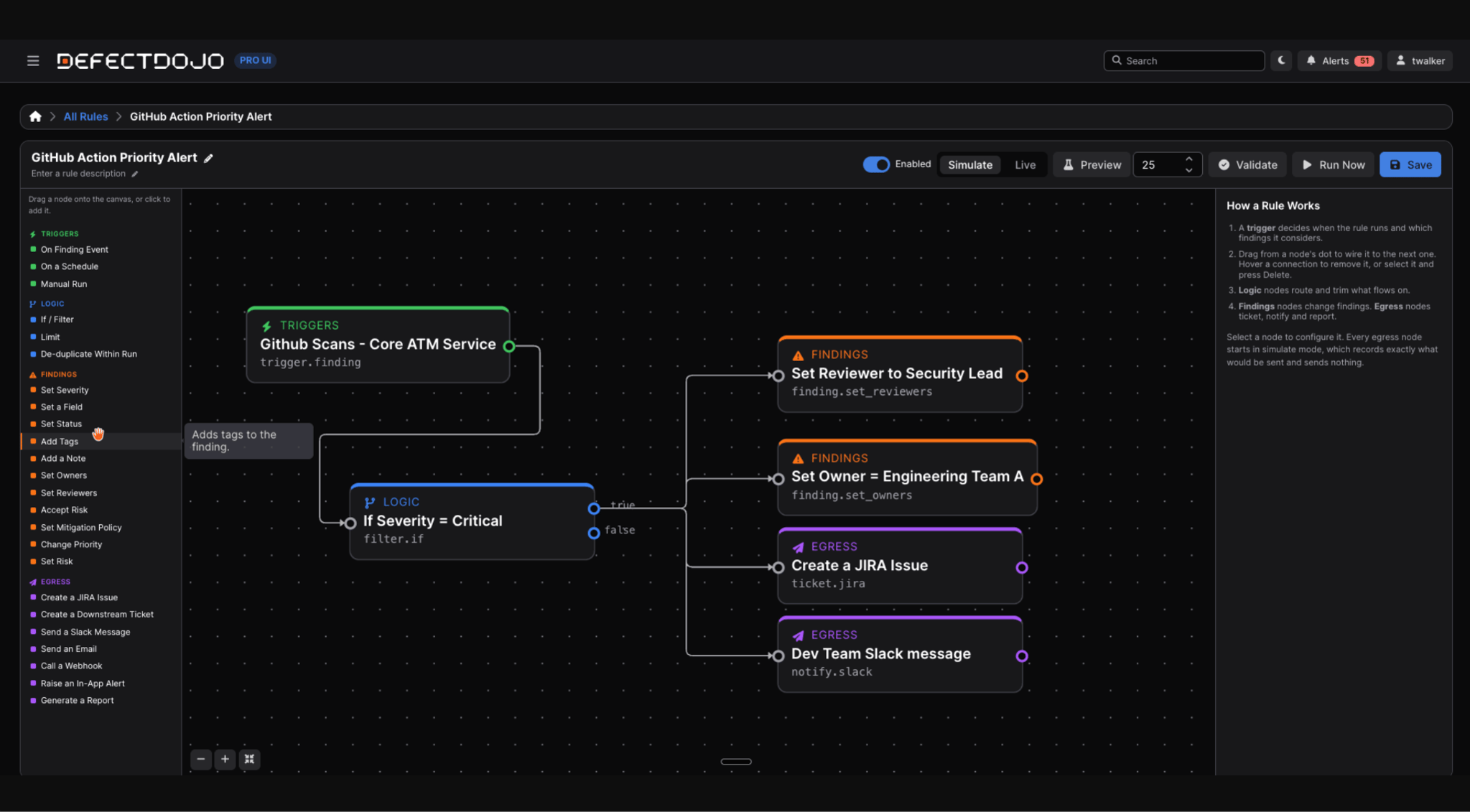
The graph also helps to visualize four major additions to Rules Engine 2.0’s capabilities:
- Branching: A single rule can evaluate a condition and take different actions depending on the result. For example, Critical Findings can be sent to a ticketing system while lower-severity Findings are tagged for weekly review—all within the same rule.
- Egress: Rules can trigger actions beyond DefectDojo itself. Depending on the workflow, a rule can create a Jira or other downstream ticket, send a message through Slack or Microsoft Teams, deliver an email, call a webhook, display an in-app notification, or produce a report.
- Traceability: Rule activity is captured at each stage of execution. Runs provide a record of how the rule progressed through its nodes, while Deliveries log outbound actions, including their destination, payload, and outcome.
- Simulation: Rules can be run in a mode that executes Finding changes while recording egress actions without actually sending them. This provides a safe way to validate and refine a rule before enabling external actions.
Even with these updated features, existing Rules Engine workflows don't have to disappear. Rules Engine and Rules Engine 2.0 can run side by side, with a converter available for teams that want to migrate existing Rules.
Putting the Triage Engine to Work
A critical vulnerability in a production application shouldn't follow the same path as a low-severity issue in a development environment. When every Finding is met with the same scrutiny regardless of its context or actual risk, you waste time on what can be safely reviewed later at the expense of what needs immediate attention. Fortunately, Triage Engine allows you to deal with both simultaneously.
For example, you can set an If/Filter node so that any critical Findings are automatically assigned a specific tag and owner, a Slack message is sent alerting the newly assigned owner, and a corresponding Jira is created. Any other Findings can then be passed through additional If/Filter conditions based on their severity, Finding attributes, or Asset context, with separate actions for each one, allowing you to contain entire decision trees within a single Rule.
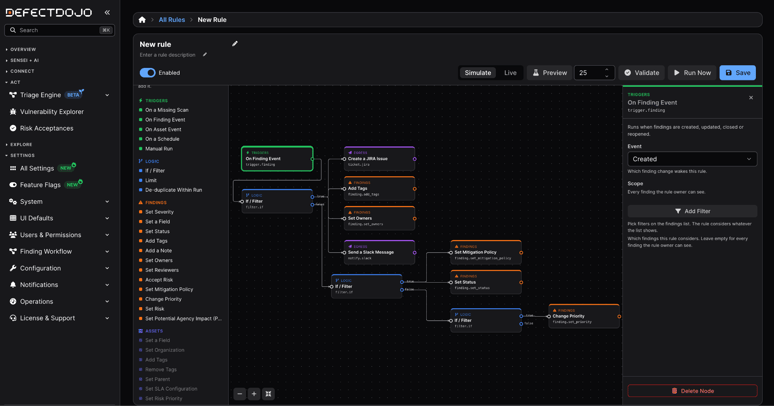
Ultimately, each different path can be represented within a single workflow rather than forcing teams to maintain separate rules for every scenario.
And Triage Engine can work with more than just Findings. Asset rules can respond when Assets are created, updated, or tagged, or automatically review them on a schedule. They can then update Asset fields, apply or remove tags, move Assets between Organizations, and organize them within the Asset hierarchy. Instead of reorganizing your inventory every time new Assets are added, you can define the rules once and let DefectDojo consistently apply that structure as your environment changes.
From Triage to Remediation: What Happens Next?
Once a triage decision has been made, DefectDojo can help move that decision into your team’s existing workflow. With the ability to create a Jira or Downstream Connector ticket, send a Slack message, Microsoft Teams message, or an email, publish to an SNS topic, call a webhook, raise an in-app alert, or generate a report, Triage Engine creates the work in the place where your remediation is already happening. So rather than asking security teams to manually translate triage decisions into tickets, notifications, or other downstream actions, Triage Engine can make those handoffs part of the workflow itself.
Trusting The Process: Ensuring Oversight Of Your Automation
The more you automate, the more important visibility becomes. Triage Engine allows you to preprogram countless routine triage decisions, but if something goes wrong, you still need to know why. That’s why it includes features that help you pre-empt any faulty runs and retrace how any changes were made.
Simulation
Simulation lets you run a Rule against real Findings while preventing outbound actions from actually being sent, giving you a safe way to validate the workflow before enabling it in your environment. Finding changes still occur, but nothing leaves DefectDojo.
Runs
Triage Engine records every execution as a Run, capturing the rule that was executed, what or who triggered it, its status and timing, the node-by-node trace, and any errors.
For example, if you expected 400 Findings to be routed into a particular workflow but none were, the trace can show that 400 entered the filtering node but zero passed the condition.
Deliveries
Deliveries catalog everything a Run has sent externally, recording details such as the payload, destination, status, retry count, and the response from the destination. Skips are also recorded, so you can better distinguish between a Rule that didn’t try to send anything and a Rule that tried to send something because a condition prevented it.
Provenance
Provenance allows you to identify which Rule, Run, or node caused a change to the Finding, which is visible on the Finding itself. Instead of having to reverse-engineer the rules, the Finding can tell you which automation caused the change.
Scaling For Efficiency: Where To Now?
As vulnerability volume grows, security teams need the right Findings to receive the right attention.
Triage Engine allows you to take your organization’s decision-making process and automate repeat actions at scale, within your existing workflows, while preserving visibility and accountability. The result is a triage process that can keep pace with the security program it supports, consistently applying organizational context, routing Findings to the right workflows, and leaving security teams to focus their time where human judgment matters most.
Ready to make your own Rules? Check out the DefectDojo documentation to see how Triage Engine can work for you.