Automation is the goal for many security teams. Every AppSec team has a story about how painful it is to manually update wrong findings, send noisy notifications via Slack channels, or clean up sometimes hundreds of duplicate JIRA tickets. This keeps a lot of teams doing triage by hand, even when the work is repetitive and the logic is obvious.
Rules Engine 2.0, now available in Beta for DefectDojo Pro, is built to make it easy to set up automations that trigger when new events happen. It is a visual automation builder where every rule is a graph you can see, every execution is traced node by node, and every outbound message is recorded before it is ever sent. You can even run a rule in simulate mode and watch exactly what it would do before it touches anything outside DefectDojo.
From flat lists to graphs
The original Rules Engine applies an ordered list of actions to every finding that matches a single filter. That model works well for straightforward jobs, and it is not going anywhere. Both engines run side by side, your existing rules keep working, and a converter is available when you want to move them across.
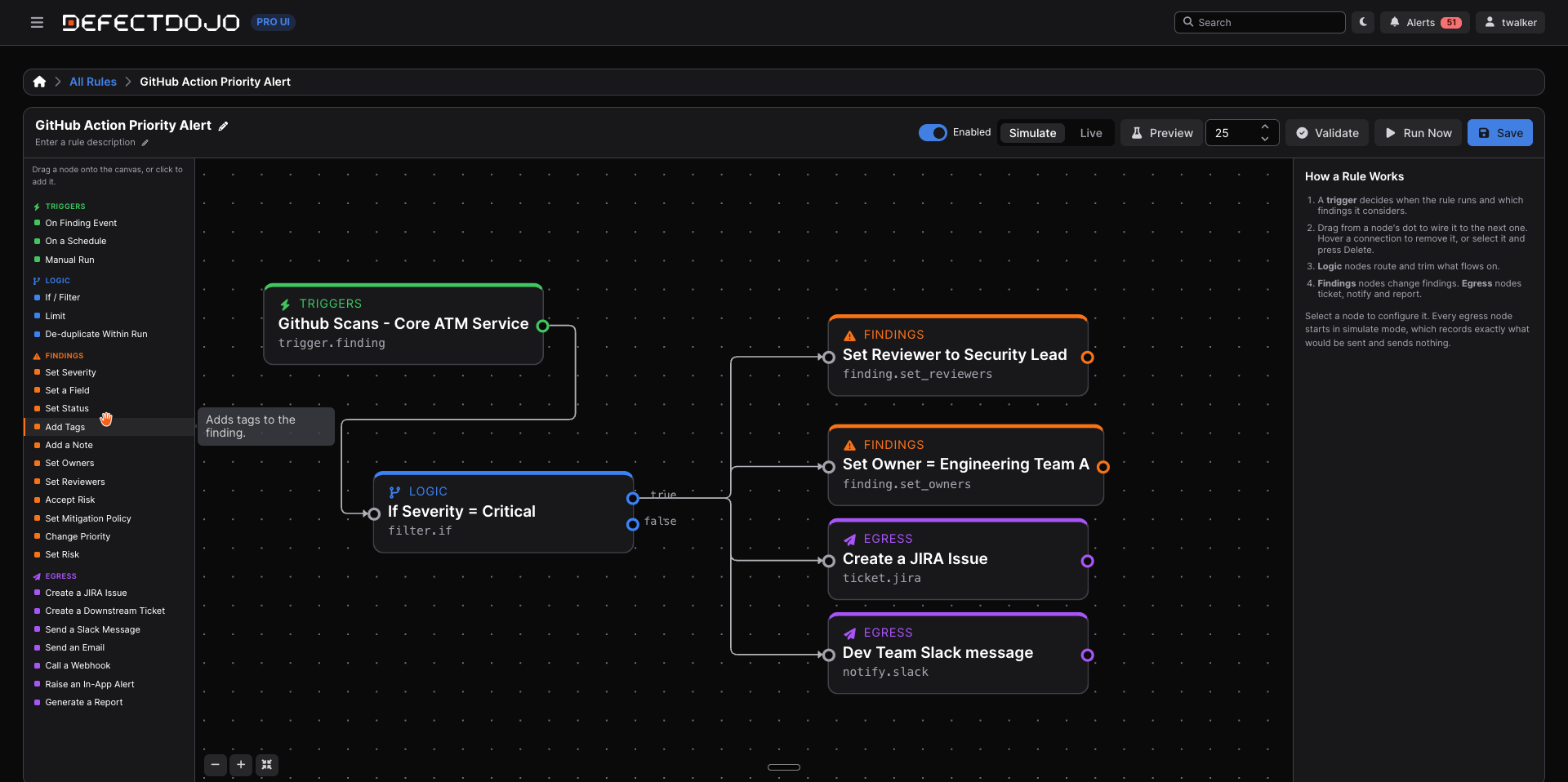
Rules Engine 2.0 changes the shape of a rule. Instead of one filter and a flat action list, a rule is a graph: a trigger node that decides when the rule wakes up, plus any number of logic, finding, and egress nodes wired together to define what happens next. The Node Reference documents all 25 nodes available in the builder.
That structural change unlocks four capabilities:
- Branching. An If/Filter node routes findings down a true branch and a false branch. One rule can escalate Critical findings to a ticket while tagging everything else for weekly review, without being split into two separate rules.
- Egress. Rules can now leave DefectDojo. Open a JIRA issue or downstream ticket, post to Slack or Microsoft Teams, send an email, call a webhook, raise an in-app alert, or generate a report, all from within the rule graph.
- Traceability. Every execution is recorded as a Run with a per-node trace. Every outbound send is recorded as a Delivery that shows exactly what was sent, where it went, and how it ended.
- Simulate mode. A rule can record precisely what it would send without sending anything. This is how you test a rule safely before letting it interact with the outside world.
Test in simulate, ship in live
Every new rule is created disabled, and every rule defaults to simulate mode. Simulate runs the entire graph for real, including finding edits, but egress nodes stop short of the actual send. Instead, they write what they would have sent to the Deliveries ledger, marked as simulated, with the full payload attached.
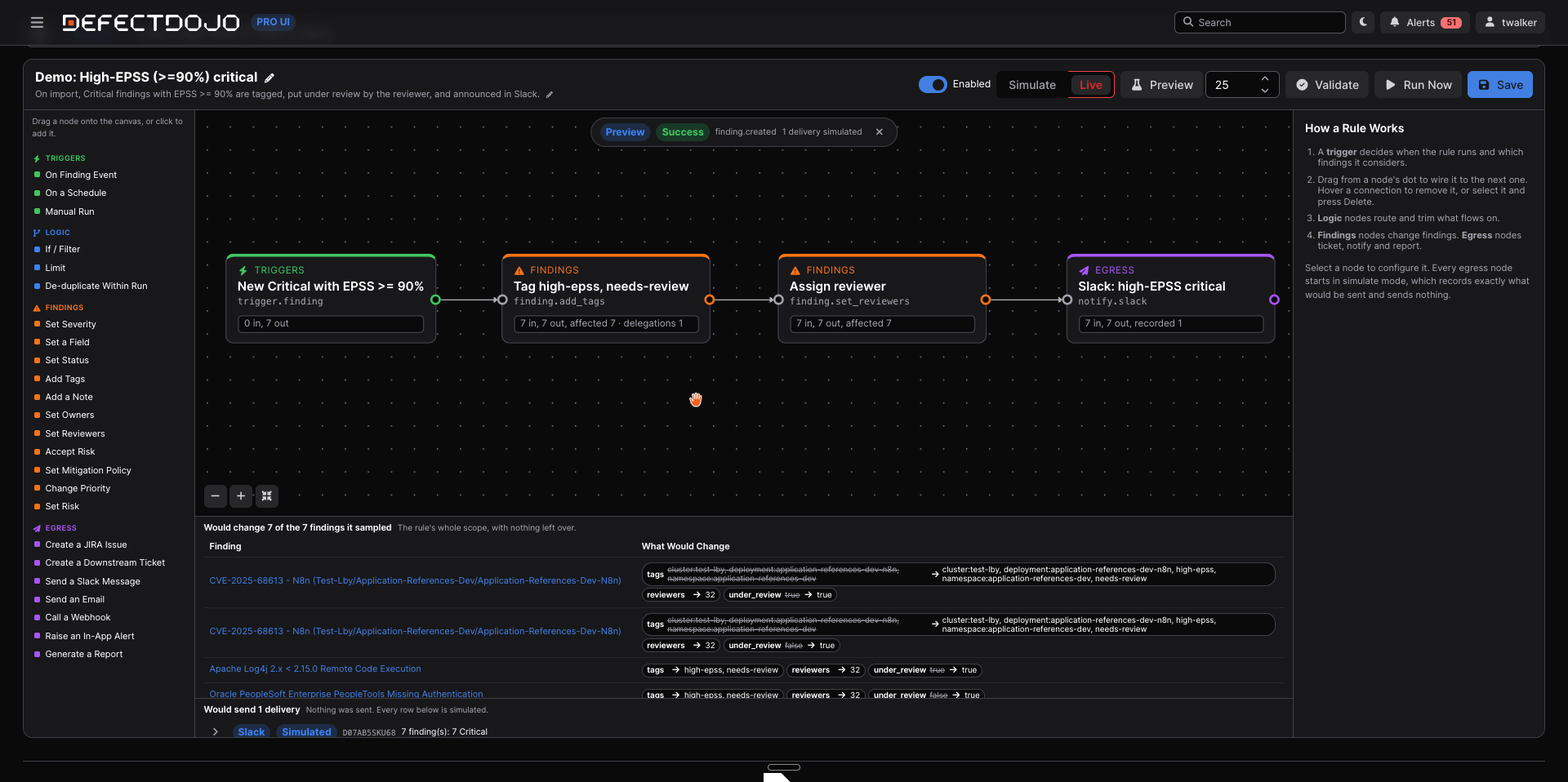
That means the review workflow for a new automation is concrete rather than hypothetical. Build the rule, run it in simulate, open Deliveries, and read the exact JIRA payloads, Slack messages, and webhook calls it would have produced. When the output looks right, flip the rule to live. Mode applies to the whole rule rather than individual nodes, because a graph where some sends are real and others are not is harder to reason about than two rules.
An audit trail for your automation
Rules Engine 2.0 treats observability as a first-class feature, not an afterthought.
Runs capture every execution: the event that triggered it, its status, its per-node trace, and any error. A rule can only have one run in progress at a time, so a busy rule queues instead of racing with itself.
Deliveries form a ledger of everything rules have sent outward. Each row is written before any network call happens and holds the payload, the resolved destination, the status, the retry count, and whatever the destination said back. Skips are recorded too, so "the rule did nothing" and "the rule did nothing because the finding was already ticketed" are distinguishable at a glance.
Provenance closes the loop. Every change a rule makes to a finding is attributed back to the rule, the run, and the node that made it, and that timeline is visible on the finding itself. When someone asks "why did this finding change?", the answer is on the record, not buried in rule definitions.
Runs and deliveries are retained for 180 days by default, and both windows are configurable. The product shows you the retention window and the date a record will be pruned rather than leaving it implicit. For compliance and audit readiness, that combination of pre-send logging, per-node traces, and finding-level attribution means your automation is as auditable as the rest of your vulnerability management program.
Built for permission-aware scale
Every rule runs as its owner and sees exactly the findings that user can see, through the same authorization model used everywhere else in DefectDojo. Narrow the owner's access and you narrow the rule. If an owner's account is deleted, the rule matches nothing until a new owner takes it over, which is a safe failure mode by design.
There is no cap on how many findings a run handles. Rules process everything their scope matches, working in chunks so memory stays bounded instead of coverage. Whether a trigger matches ten findings or ten thousand, the rule works through all of them.
Getting started
Rules Engine 2.0 is a DefectDojo Pro feature, currently in Beta and off by default. A superuser can enable it from Settings > Feature Flags on both Cloud and On-Premise instances. Once the flag is on, a Rules Engine 2.0 section appears in the Pro UI sidebar with three pages: All Rules for creating and managing rules, Runs for execution traces, and Deliveries for the outbound ledger.
Access is governed by two global role permissions shared with the original Rules Engine. Rule View grants visibility, and Rule Edit grants the ability to create, change, run, delete, convert, and replay. Because a rule author can reach any finding the rule's owner can see and can direct output at external systems, treat Rule Edit as an administrative permission and grant it deliberately.
To dig deeper, start with the Rules Engine 2.0 documentation, then move on to Building Rules and the Node Reference. If you have existing rules, the conversion guide covers moving them across.
Security automation should not require a leap of faith. With Rules Engine 2.0, we’re making it easier to automate, triage, and assign issues at scale.