
From Pictures to Motion Pictures, and Import to Reimport
I have a confession: I didn’t study computer science.
I also didn’t study software engineering, cybersecurity, or any other relevant major that would make sense for someone working for an application security company. In fact, I studied fashion design. So you can imagine, dear reader, my daily confusion with the litany of acronyms and concepts that abound in this humble industry. SAST/DAST/IAST, zero-day, CVE, attack surface, CRUD… the list goes on.
But the concept that took by far the longest to wrap my head around now seems strikingly easy to grasp: the difference between the Import and Reimport functions.
Each one is used to add scan results to Tests in DefectDojo. They both accept the same file, and they both show up in Import History. So what’s the difference between them?
Similar Names, Separate Functions
Import was originally added to DefectDojo in its very earliest versions. Its purpose was simple: capture a point-in-time assessment for new occurrences of data.
Each time you import a scan report (from SAST, a dependency scan, and so on), DefectDojo stores it in a new Test and creates a Finding for every vulnerability in the report.
However, the reality of application security is that you won’t just scan once and call it a day. Every week you’re scanning your network infrastructure, or you’re doing a container scan on every deploy.
Reimport was added later to address exactly this. It represents testing efforts where the scope of each Test hasn’t changed. That way, you can see how the Findings shift from one scan to the next.
In essence, Import is for new occurrences of data, while Reimport is for further iterations of the same data in the same context. Import records what a scan found, and Reimport records what changed since the last scan.
From Photography to Film
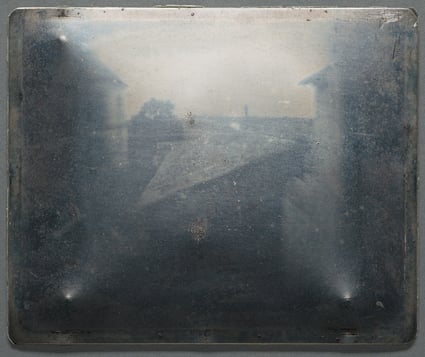
The world’s oldest surviving photograph, View from the Window at Le Gras, was taken sometime in the summer of 1827.
It wasn’t until The Horse in Motion in 1878 that anyone put images in sequence to create a sense of movement.
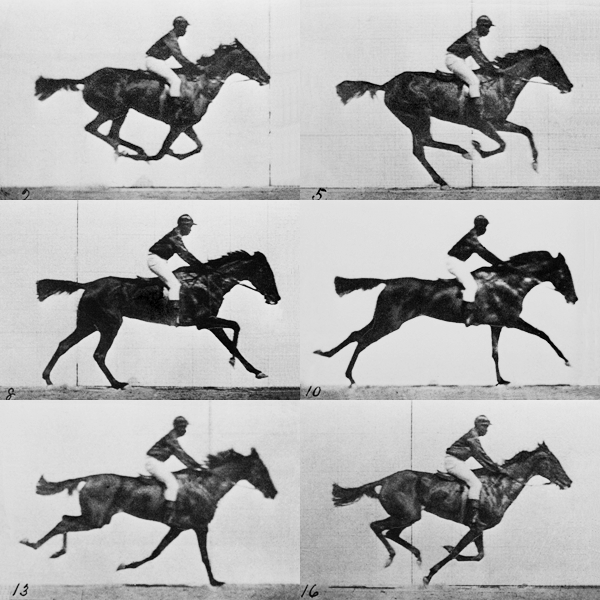
Reimport functions similarly by imbuing Findings with a “sense of movement.” It still includes frames of the same subject, but its meaning is derived from the difference between them.
If you watch a movie one frame at a time, it’s harder to follow the arc of the plot. Relying solely on Import to ingest your data would present you with the same problem: you can see what’s there, but not what’s changing.
One Scenario, Two Outcomes
Picture a nightly scan of one repository, run once each day.
On Monday, the scan reports 16 Findings, and the same 16 show up in each scan through Thursday. After Thursday’s scan, the team fixes 15 of them, so Friday’s scan reports only the one that remains.
With Import, each day’s run would create a separate Test with its own full set of Findings. Come Friday, there are five separate Tests, and the same vulnerabilities appear in each one. Each Import is a new photograph. Deduplication can flag the repeats, but you still have to compare them separately to figure out what actually changed.
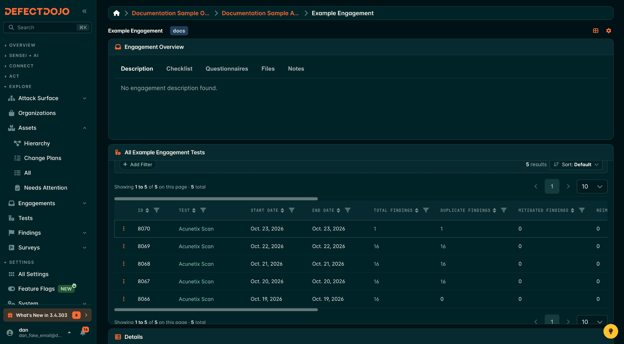
Each Import creates a separate Test, so duplicate Findings from earlier scans pile up, and nothing shows as Mitigated even after the fix. The Reimports column remains 0 because each scan has been imported separately.
With Reimport, each run feeds a single Test and diffs the scan against the existing Test. It will then create Findings for newly introduced issues, log unchanged ones, close Findings that disappeared, and reopen any that have reappeared.
That Test then becomes a living document of that scanning pipeline over time. Recurring scans are contained within one Test page, where Import History records what was created, closed, reactivated, and left untouched on each run, along with metadata like timestamp, branch/tag, build ID, commit hash, and version (when provided).
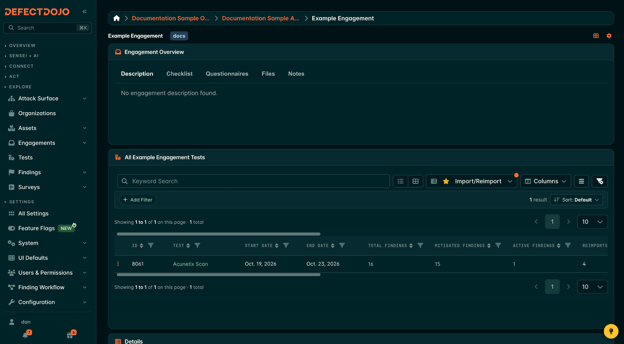
Reimporting each subsequent scan into the original Test keeps track of whether the Findings persisted, were mitigated, or recurred. The Reimports count increases by 1 with each ingestion of the next scan.
Imports, like photographs, can still tell a story. And sometimes photographs are even more impactful specifically because they isolate a moment in time from what came before or what followed. But in application security, following Findings through time is essential to keeping your security posture strong. Reimport is equipped to help you do just that.
Some Worthwhile Caveats
Before you start defaulting to Reimport for every scan, there are a few things worth acknowledging.
- Reimporting via the API lines up an incoming scan with an existing Test using the scan type and the test title, if you’ve set one. If either is changed, or if no matching Test is found, Reimport will create a new Test, so your pipeline can still use Reimport from day one.
- With deduplication enabled, both Import and Reimport can flag repeat Findings, either within a single tool or across different ones. So deduplication isn’t what separates them. What Reimport adds is memory: it compares each scan against the last, so Findings are closed when they disappear and reopened if they return.
- A one-off pen test report or the first scan of a brand-new target has no need for a Reimport. Sometimes Import is still the right tool for the job. Similarly, your organization’s policies may require “snapshot” or “point-in-time” style reporting. Using Import is a more practical approach in those cases.
Do You Need a Photo or a Film?
Looking back, my confusion between Import and Reimport makes sense. They seem like two buttons that do the same thing, but really, one captures a moment and the other is defined by movement.
So the next time you have a scan to load, ask yourself the question that finally made it click for me: do I want a photograph, or do I want to see what’s changed since the last frame?